8. 08 - Observe Retrieval Before Generation Workshop#
Time: 35 minutes · Audience: beginners · Updated: November 18, 2026.
8.1. Workshop preparation#
Python 3.10+ and the workshop kit; no API key or model required.
Download the shared workshop kit and extract it into a disposable folder. Browse all workshops. Code blocks run in your local terminal, not on this web page. Record your tool versions and use synthetic inputs.
8.2. Hands-on route#
Read the three source records in retrieval.py and predict which source should answer “library opens”.
Run
python retrieval.py. Verify S1 is ranked first and the unsupported parking question returns an empty list.Add a fourth source that also mentions the library but contains no opening time. Run again and inspect distractors.
Try “What time can I borrow books?” and compare it with “library opens”. Write down why lexical matching can miss paraphrases.
Create a table of five questions, expected source IDs, and returned IDs. Report retrieval success separately from answer quality. Do not call the baseline semantic vector search.
from retrieval import retrieve
for question in ['library opens', 'library closes', 'makerspace safety',
                 'parking fees', 'What time can I borrow books?']:
    print(question, retrieve(question))
8.3. Acceptance evidence#
A five-question retrieval evaluation and one documented limitation.
Create evidence.md with your environment, commands, observed outputs, failures and fixes. Label anything you did not run. Do not include secrets, screenshots of account pages, or private paths.
8.4. Troubleshooting and cleanup#
Empty retrieval can be correct for missing evidence. Adding a generator will not repair a missing source; inspect retrieval first. Stop any demo server when finished; retain only the small fixture and evidence needed to reproduce your result.
        flowchart LR
    A["Prepare synthetic fixture"] --> B["Run guided task"]
    B --> C["Check observed result"]
    C --> D["Record evidence and limitations"]
Image Suggestion (Nanobanana Prompt): A clean technical workshop illustration titled “Observe Retrieval Before Generation”, with a neutral editor window, a small synthetic fixture, and an evidence checklist. Use legible navy and teal typography on a light background, even lighting, and a visible “Concept illustration” label. Show no account identity, private paths, or simulated success presented as a screenshot.
8.5. Reference and optional extensions#
The material below provides background. Complete the guided acceptance test above first; vendor interfaces and example model IDs can change. Consult the linked official documentation for the version you use.
This chapter explains the core concepts behind Retrieval-Augmented Generation from the ground up. By the end, you will understand why RAG exists, how every component works, and when to use it.
8.6. The Problem RAG Solves#
Imagine you are building a customer support chatbot for your company. Your product manual is 500 pages long. You have a powerful LLM like GPT-4o or DeepSeek, but:
Approach |
Problem |
|---|---|
Ask the LLM directly |
It has never seen your internal docs → hallucination |
Paste the entire manual into the prompt |
Too long → exceeds context window, slow, expensive, loses focus |
Paste only relevant paragraphs |
✅ Perfect — but how do you find the “relevant” parts automatically? |
RAG is the answer to that third question. It retrieves the most relevant pieces of your documents, then feeds them — alongside the user’s question — to the LLM for generation.
RAG = Retrieve first, then Generate.
8.7. The Two Phases of RAG#
The entire RAG pipeline splits cleanly into two phases:
Phase A — Data Preparation (Before the user asks)
Chunking: Split documents into small pieces.
Indexing: Convert each chunk into a vector and store it in a vector database.
Phase B — Answering (After the user asks)
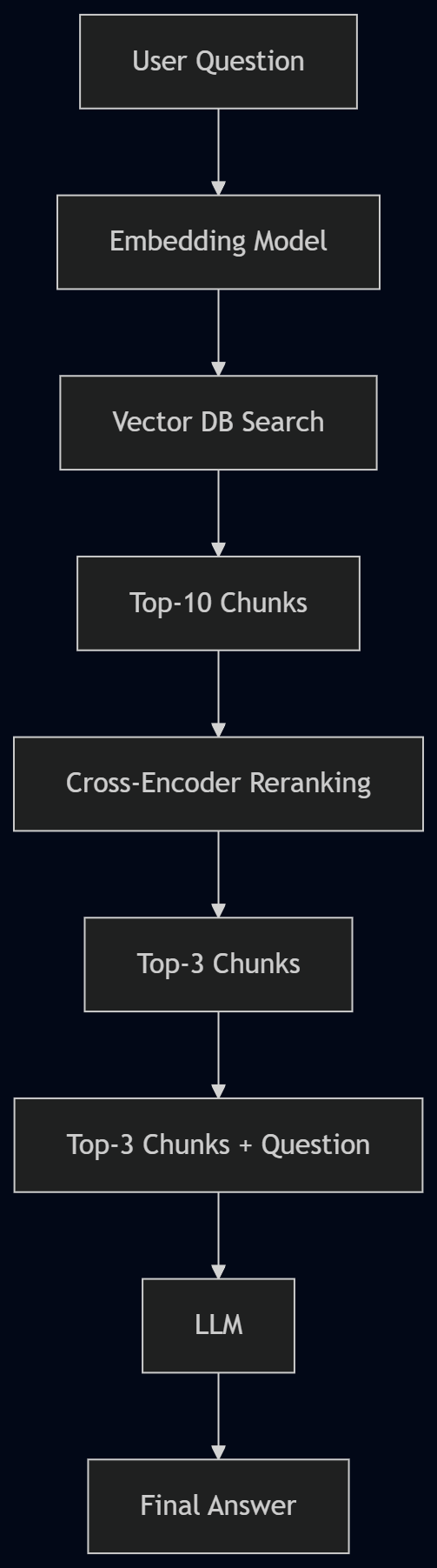
Retrieval: Find the top-N most relevant chunks.
Reranking: Refine the ranking for higher accuracy.
Generation: Feed the top chunks + question to the LLM for a final answer.
Phase A: Data Preparation

Phase B: Answering
8.8. Chunking: Splitting Documents#
Chunking is the process of breaking a large document into smaller, manageable pieces. The quality of your chunks directly impacts the quality of your answers.
8.8.1. Common Chunking Strategies#
Strategy |
Description |
Pros |
Cons |
|---|---|---|---|
Fixed-size |
Split every N characters (e.g., 1000 chars) |
Simple, predictable |
May cut mid-sentence |
Sentence-based |
Split by sentence boundaries |
Preserves meaning |
Some sentences are too short |
Paragraph-based |
Split by paragraph ( |
Natural text units |
Paragraphs vary wildly in size |
Recursive |
Try paragraph → sentence → character |
Best general approach |
More complex to implement |
Semantic |
Use an LLM to determine natural break points |
Highest quality |
Slow and expensive |
8.8.2. The Overlap Trick#
When chunks are split at a boundary, context can be lost. For example:
“Dr. Wang is a leading researcher in urban computing. He developed a novel algorithm…”
If “Dr. Wang” is in Chunk 1 and “He” starts Chunk 2, the pronoun loses its reference. The solution is overlapping chunks — each chunk includes the last few sentences of the previous one:

8.9. Embedding: Turning Text into Vectors#
8.9.1. What is a Vector?#
A vector is simply an array of numbers. In the context of RAG:
A 1-dimensional vector:
[3.0]A 2-dimensional vector:
[1.0, -2.0]A 768-dimensional vector:
[0.12, -0.45, 0.78, ..., 0.33](768 numbers!)
Real embedding models produce vectors with hundreds to thousands of dimensions (e.g., 768 or 1536). More dimensions = richer semantic representation.
8.9.2. What is Embedding?#
Embedding is the process of converting text into a fixed-length vector using a specialized Embedding Model. The key property is:
Semantically similar text produces vectors that are close together in vector space.
For example (simplified to 2D for visualization):
“Mark likes to eat fruit” →
[1.0, -2.0]“Mark loves eating fruit” →
[1.1, -1.8]← very close!“The weather is nice today” →
[-3.0, -1.0]← very far away
8.9.3. Popular Embedding Models#
Model |
Dimensions |
Provider |
|---|---|---|
|
1536 |
OpenAI |
|
3072 |
OpenAI |
|
384 |
Sentence Transformers (free) |
|
768 |
Nomic / Ollama (free, local) |
|
1024 |
BAAI (free) |
💡 Tip: Check the MTEB Leaderboard to compare embedding model quality.
8.10. Vector Databases#
A vector database is a specialized storage system optimized for storing, indexing, and querying vectors.
8.10.1. How It Works#
Each record in a vector database typically stores:
An ID (unique identifier)
The original text (the chunk)
The vector (embedding of the chunk)
When you query with a new vector, the database calculates the distance between your query vector and every stored vector, then returns the closest matches.
8.10.2. Popular Vector Databases#
Database |
Type |
Best For |
|---|---|---|
ChromaDB |
In-memory / persistent |
Prototyping, small projects |
Pinecone |
Managed cloud service |
Production, zero-ops |
Weaviate |
Self-hosted / cloud |
Full-text + vector hybrid search |
Qdrant |
Self-hosted / cloud |
High-performance filtering |
pgvector |
PostgreSQL extension |
Teams already using PostgreSQL |
FAISS |
Library (Meta) |
Research, large-scale similarity |
LanceDB |
Embedded (AnythingLLM default) |
Desktop apps, serverless |
8.11. Vector Similarity: How “Closeness” is Measured#
When the vector database searches for the chunks most similar to the user’s question, it uses a similarity metric:
Metric |
What It Measures |
Intuition |
|---|---|---|
Cosine Similarity |
Angle between two vectors |
Smaller angle = more similar |
Euclidean Distance |
Straight-line distance |
Shorter distance = more similar |
Dot Product |
Combines direction + magnitude |
Higher value = more similar |
For most RAG applications, cosine similarity is the default and most reliable choice.
8.12. Retrieval: Finding Relevant Chunks#
When a user asks a question:
The question is embedded into a vector using the same embedding model.
This vector is sent to the vector database.
The database returns the Top-K most similar chunks (e.g., Top-10).
This step is fast but imprecise — like screening resumes by keyword. It casts a wide net.
8.13. Reranking: Precision Filtering#
The retrieval step returns 10 chunks, but some may be false positives. Reranking uses a more powerful (but slower) model called a Cross-Encoder to re-score each chunk.
8.13.1. How is Reranking Different from Retrieval?#
Aspect |
Retrieval (Embedding) |
Reranking (Cross-Encoder) |
|---|---|---|
Speed |
⚡ Very fast |
🐢 Slower |
Cost |
💰 Low |
💰💰 Higher |
Accuracy |
🎯 Moderate |
🎯🎯🎯 High |
Scale |
Thousands of chunks |
Only 10–20 chunks |
Think of it like a job hiring process:
Retrieval = Screening 1,000 resumes → shortlist 10 candidates
Reranking = Interviewing 10 candidates → hiring the top 3
8.14. Generation: Producing the Final Answer#
Finally, the top 3 reranked chunks and the user’s question are combined into a prompt and sent to a large language model (e.g., GPT-4o, Gemini, DeepSeek):
Based on the following context, answer the user's question.
If the answer is not in the context, say "I don't know."

Context:
[Chunk 1 text]
[Chunk 2 text]
[Chunk 3 text]

Question: What methodology did the authors use?
The LLM generates a grounded, accurate answer based on the retrieved evidence.
8.15. Known Limitations of RAG#
RAG is powerful, but it is not perfect:
Limitation |
Description |
|---|---|
Chunking artifacts |
Important info may be cut at chunk boundaries, losing co-reference (e.g., “He” loses link to “Dr. Wang”). |
Poor at global questions |
“How many times does ‘watermelon’ appear?” requires scanning ALL chunks, not just the most similar ones. |
Embedding quality ceiling |
Embedding models compress meaning — subtle nuances can be lost. |
Hallucination still possible |
If retrieved chunks are marginally relevant, the LLM may still interpolate incorrectly. |
Solutions: Advanced chunking strategies, Graph RAG (covered in Tutorial 03), hybrid search (combining keyword + vector), and agentic RAG with iterative retrieval.
8.16. Read More#
Retrieval-Augmented Generation for Knowledge-Intensive NLP Tasks (Original RAG Paper) — Lewis et al., 2020. The foundational paper introducing RAG.
MTEB Embedding Leaderboard — Compare embedding model performance.
ChromaDB Documentation — Getting started with the popular open-source vector database.
Pinecone Learning Center: What is RAG? — Visual, beginner-friendly RAG explainer.
LangChain RAG Tutorial — Step-by-step RAG implementation using LangChain.
LlamaIndex Documentation — Another popular framework for building RAG pipelines.
Sentence Transformers Library — Open-source library for embedding and cross-encoder models.
8.17. Knowledge Quiz#
Q1: Why can’t you simply paste an entire 500-page document into an LLM’s prompt instead of using RAG?
Answer
Three reasons: (1) The document may exceed the model's context window limit (2) More input = higher cost per query (3) More input = slower response time and the model may lose focus on relevant sections.Q2: What is the fundamental difference between an Embedding Model and a Large Language Model (LLM)?
Answer
An Embedding Model converts text into a fixed-length numerical vector (e.g., 768 or 1536 dimensions) that captures semantic meaning. An LLM generates natural language text as output. They serve fundamentally different roles in the RAG pipeline — embedding for search, LLM for generation.Q3: Why does a RAG pipeline use both Retrieval AND Reranking instead of just one step?