10. 10 - Retrieve a Two-Hop Evidence Path Workshop#
Time: 45 minutes · Audience: beginners · Updated: November 18, 2026.
10.1. Workshop preparation#
Python 3.10+ and graph.py from the workshop kit. No database or paid model required for the core lab.
Download the shared workshop kit and extract it into a disposable folder. Browse all workshops. Code blocks run in your local terminal, not on this web page. Record your tool versions and use synthetic inputs.
10.2. Hands-on route#
Read the three fictional edges in graph.py. Sketch which equipment is connected to Ada through Project Atlas.
Run
python graph.py. Expect two edges carrying source IDs S1 and S2 and a passing missing-entity assertion.Change depth to 1, then 3. Record which source IDs become reachable; distinguish graph reachability from proof of a broader claim.
Add a second person connected to Project Atlas. Ask whether both people work in Lab West. Explain why a project/equipment path alone does not establish personal workplace location.
Optional advanced route: follow Microsoft’s current GraphRAG quickstart with a small synthetic corpus and a deliberate indexing budget. Compare local/global questions. The offline lab is a graph-retrieval demonstration, not an implementation of Microsoft’s extraction, clustering or community summaries.
"""A provenance-preserving graph retrieval exercise, not the GraphRAG framework."""
EDGES=[('Ada','works_on','Project Atlas','S1'),('Project Atlas','uses','Sensor Q','S2'),('Sensor Q','located_in','Lab West','S3')]
def walk(start, depth=2):
    frontier={start}; found=[]
    for _ in range(depth):
        selected=[e for e in EDGES if e[0] in frontier and e not in found]
        found.extend(selected);frontier={e[2] for e in selected}
    return found
if __name__=='__main__':
    assert [x[3] for x in walk('Ada')]==['S1','S2']
    assert walk('Unknown')==[]
    print(walk('Ada'));print('PASS: two-hop path and missing entity')
10.3. Acceptance evidence#
Two-hop and three-hop path outputs plus a statement of what the graph does not justify.
Create evidence.md with your environment, commands, observed outputs, failures and fixes. Label anything you did not run. Do not include secrets, screenshots of account pages, or private paths.
10.4. Troubleshooting and cleanup#
No edges: check entity spelling. Too many relations: bound depth and keep provenance. Do not index a large private corpus as the first test. Stop any demo server when finished; retain only the small fixture and evidence needed to reproduce your result.
        flowchart LR
    A["Prepare synthetic fixture"] --> B["Run guided task"]
    B --> C["Check observed result"]
    C --> D["Record evidence and limitations"]
Image Suggestion (Nanobanana Prompt): A clean technical workshop illustration titled “Retrieve a Two-Hop Evidence Path”, with a neutral editor window, a small synthetic fixture, and an evidence checklist. Use legible navy and teal typography on a light background, even lighting, and a visible “Concept illustration” label. Show no account identity, private paths, or simulated success presented as a screenshot.
10.5. Reference and optional extensions#
The material below provides background. Complete the guided acceptance test above first; vendor interfaces and example model IDs can change. Consult the linked official documentation for the version you use.
Traditional RAG struggles with global questions (“How many times is X mentioned?”) and loses inter-chunk relationships. Graph RAG solves this by building a knowledge graph from your documents, enabling both fine-grained and high-level reasoning.
10.6. The Limitations of Traditional RAG#
Before diving into Graph RAG, let’s understand why it exists:
Problem |
Example |
Why Traditional RAG Fails |
|---|---|---|
Global questions |
“What are the main themes of this article?” |
No single chunk answers this — the answer spans the entire document. |
Counting / aggregation |
“How many times is ‘watermelon’ mentioned?” |
“Watermelon” appears across many chunks; no single chunk is “most similar.” |
Cross-chunk reasoning |
“Does Wang prefer fruit over vegetables?” |
The answer requires connecting information scattered across multiple chunks. |
Pronoun resolution |
Chunk 1: “Dr. Wang…” Chunk 2: “He also…” |
“He” loses its reference to “Dr. Wang” after chunking. |
Core insight: Traditional RAG treats every chunk as an isolated island. Graph RAG builds bridges between them.
10.7. What is a Knowledge Graph?#
A knowledge graph is a structured representation of information as a network of entities (nodes) and relationships (edges).
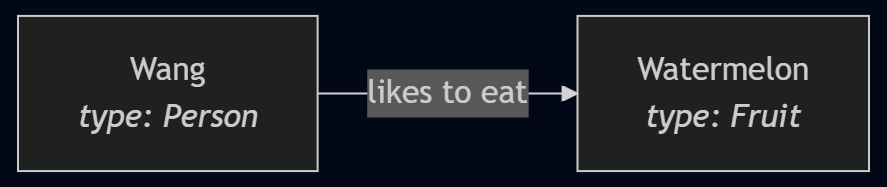
Example sentence: “Wang likes to eat watermelon.”
In a knowledge graph, this becomes:
10.7.1. Formal Terminology#
Term |
Meaning |
Example |
|---|---|---|
Entity (Node) |
A distinct thing in your data |
“Wang”, “Watermelon” |
Relationship (Edge) |
A connection between entities |
“likes to eat” |
Attribute / Property |
Metadata on nodes or edges |
Wang.type = “Person” |
LPG |
Labeled Property Graph — a graph where nodes and edges can carry labels and properties |
The full structure above |
10.8. How Graph RAG Builds the Knowledge Graph#
Before LLMs, building knowledge graphs required complex NLP pipelines (NER models, dependency parsers, etc.). Graph RAG leverages LLMs to do it all with prompts.
10.8.1. Step 1: Entity and Relationship Extraction#
For each text chunk, Graph RAG sends a prompt to the LLM:
Goal: Extract entities and relationships from the following text.

Entity types to identify: [Person, Object, Location, Event, Concept]

For each entity, provide:
- Entity name
- Entity type
- Brief description

For each relationship, provide:
- Source entity
- Target entity
- Relationship description

IMPORTANT: Only extract information explicitly stated in the text.
Do NOT invent or infer information not present.

Text:
"Wang likes to eat watermelon. Xiao Wang also likes watermelon.
The watermelon tastes sweet."
The LLM returns structured output like:
Entities:
  - Wang | Person | A person who likes watermelon
  - Xiao Wang | Person | Another person who likes watermelon
  - Watermelon | Fruit | A fruit that tastes sweet

Relationships:
  - Wang → likes to eat → Watermelon
  - Xiao Wang → likes to eat → Watermelon
  - Watermelon → has taste → Sweet
10.8.2. Step 2: Data Gleaning (The “LLM PUA” Loop)#
After the initial extraction, Graph RAG sends the results back to the LLM and asks:
“Here is the knowledge graph you generated. Is there anything you missed? Any additional entities or relationships to add?”
If the LLM says yes, it adds more. Then Graph RAG asks again. This loop continues until the LLM confirms: “I have nothing more to add.”
This iterative refinement process is called Data Gleaning and significantly improves extraction completeness.
10.8.3. Step 3: Merging Across Chunks#
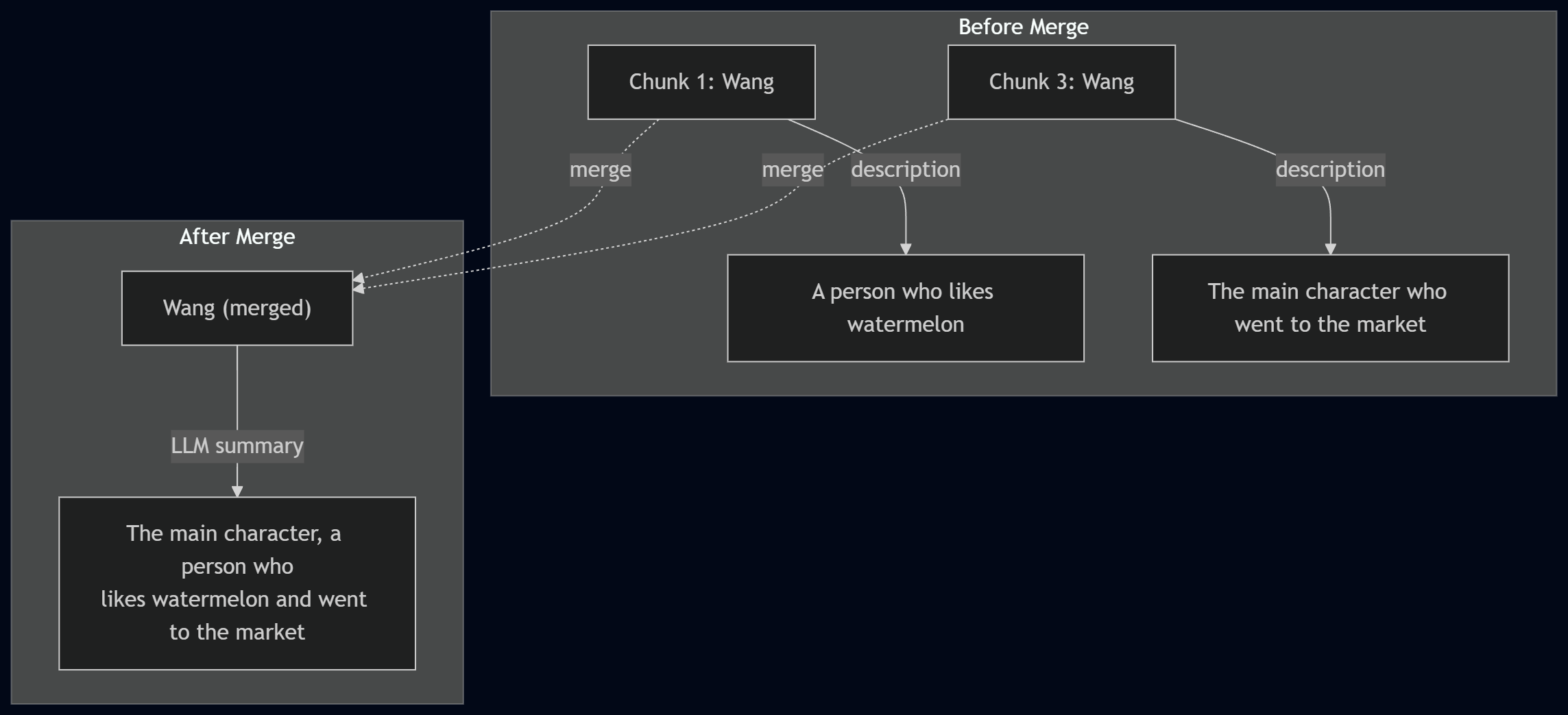
After processing every chunk independently, Graph RAG merges entities with the same name:
All “Wang” nodes from different chunks → merged into one “Wang” node.
All “Watermelon” nodes → merged into one “Watermelon” node.
Descriptions from different chunks are concatenated, then sent to the LLM to generate a unified, coherent summary.
10.9. Community Detection: Building Hierarchies#
A knowledge graph for a long document can have hundreds or thousands of nodes. To make it navigable, Graph RAG applies Leiden community detection to cluster densely connected nodes.
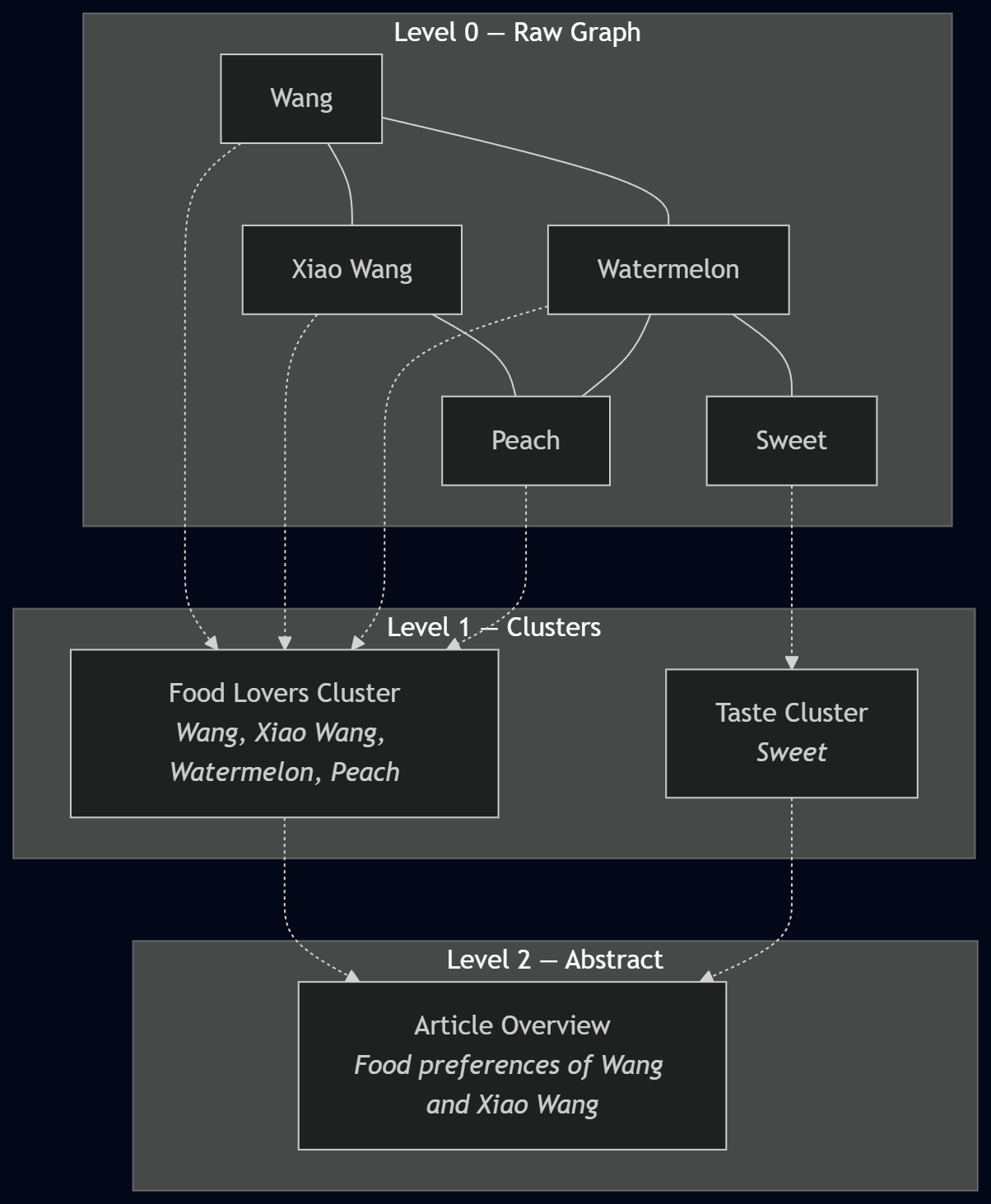
At each level, the LLM generates a summary description for the cluster. Crucially, these summaries can contain inferred information not explicitly in any single chunk:
“Xiao Wang only likes watermelon. Combined with Wang’s preference for both watermelon and peach, we can infer that Xiao Wang does not like peach.”
This is reasoning that traditional RAG simply cannot perform.
10.10. Indexing: Embedding the Graph#
Once the hierarchical knowledge graph is built, Graph RAG converts everything into searchable vectors:
Entity descriptions → embedded and stored in vector DB
Relationship descriptions → embedded and stored
Community summaries (each level) → embedded and stored
Original text chunks → embedded and stored (just like traditional RAG)
10.11. Querying: Local Search vs. Global Search#
Graph RAG offers two complementary search strategies:
10.11.1. Local Search (Bottom-Up)#
Best for: Detailed, specific questions (“What does Wang like to eat?”)
Embed the user’s question.
Search the lowest-level graph entities for the most similar matches.
Use the graph’s mapping to pull in:
Connected neighboring entities and relationships
The original source text chunks
Higher-level community summaries
Package everything and send to the LLM.
10.11.2. Global Search (Top-Down)#
Best for: Abstract, panoramic questions (“What is the main theme of this article?”)
Start from the highest-level community summaries.
Find the most relevant high-level clusters.
Drill down into their sub-communities for supporting detail.
Package everything and send to the LLM.
Feature |
Local Search |
Global Search |
|---|---|---|
Starting point |
Bottom of hierarchy |
Top of hierarchy |
Strength |
Precise, detail-rich answers |
Broad, thematic answers |
Example query |
“What are Wang’s hobbies?” |
“Summarize the key themes” |
10.12. Graph RAG vs. Traditional RAG#
Aspect |
Traditional RAG |
Graph RAG |
|---|---|---|
Data structure |
Flat list of chunks |
Hierarchical knowledge graph |
Cross-chunk reasoning |
❌ Each chunk is isolated |
✅ Entities link across chunks |
Global questions |
❌ Poor |
✅ Community summaries handle these |
Inferred knowledge |
❌ Only explicit text |
✅ LLM can reason at cluster level |
Token cost |
💰 Low |
💰💰💰 High (LLM used in indexing) |
Setup complexity |
Simple |
Complex |
Best for |
FAQ, support docs |
Research papers, reports, legal docs |
10.13. Getting Started with Graph RAG#
10.13.1. Option A: Microsoft’s GraphRAG (Python)#
pip install graphrag

# Initialize a project
python -m graphrag init --root ./my_project

# Index your documents (builds the knowledge graph)
python -m graphrag index --root ./my_project

# Query with local search
python -m graphrag query --root ./my_project --method local \
  --query "What does Wang like to eat?"

# Query with global search
python -m graphrag query --root ./my_project --method global \
  --query "What are the main themes of this document?"
10.13.2. Option B: Neo4j + LangChain#
from langchain_community.graphs import Neo4jGraph
from langchain_experimental.graph_transformers import LLMGraphTransformer
from langchain_openai import ChatOpenAI

# Connect to Neo4j
graph = Neo4jGraph(url="bolt://localhost:7687", username="neo4j", password="password")

# Use LLM to extract graph from documents
llm = ChatOpenAI(model="gpt-4o")
transformer = LLMGraphTransformer(llm=llm)
graph_documents = transformer.convert_to_graph_documents(documents)

# Store in Neo4j
graph.add_graph_documents(graph_documents)
10.14. When to Use Graph RAG#
✅ Use Graph RAG when:
Your documents are long and complex (research papers, legal contracts, technical manuals).
Users ask questions that require cross-document reasoning.
Global/thematic questions are common.
Accuracy matters more than cost.
❌ Stick with Traditional RAG when:
Documents are short and self-contained (FAQs, product descriptions).
Questions are simple and fact-retrieval based.
Budget is limited (Graph RAG consumes significantly more LLM tokens during indexing).
Low-latency responses are critical.
10.15. Read More#
GraphRAG: Unlocking LLM Discovery on Narrative Private Data (Microsoft Research) — The original Microsoft blog post introducing Graph RAG.
Microsoft GraphRAG GitHub Repository — Official open-source implementation.
From Local to Global: A Graph RAG Approach (Paper) — The academic paper behind Microsoft GraphRAG.
Neo4j Graph Database — Popular graph database engine for storing knowledge graphs.
LangChain Graph Transformers — Build knowledge graphs from documents using LangChain.
Leiden Community Detection Algorithm — The clustering algorithm used by Graph RAG.
Knowledge Graphs: A Comprehensive Survey — Academic survey of knowledge graph techniques.
10.16. Knowledge Quiz#
Q1: What is “Data Gleaning” in the Graph RAG pipeline?
Answer
Data Gleaning is an iterative loop where Graph RAG sends the extracted knowledge graph back to the LLM and asks: "Did you miss anything? Is there more to add?" The LLM adds more entities/relationships, and the process repeats until the LLM confirms nothing is left. This improves extraction completeness.Q2: Why is Graph RAG significantly more expensive (in tokens) than traditional RAG?
Answer
Traditional RAG only calls the LLM once per user query (at generation time). Graph RAG calls the LLM extensively during the INDEXING phase — for entity extraction, data gleaning loops, description merging, community summarization at every hierarchy level. The LLM cost is front-loaded into the preparation phase.Q3: When would you use “Global Search” instead of “Local Search” in Graph RAG?